
I had this idea for (yet another) package tracking web service, and in the process of making it I got really into tracking numbers.
So I wrote this gem, which made it possible to detect and identify tracking numbers, and to tell if it’s even valid.
1
2
3
4
5
6
7
  t = TrackingNumber.new("MYSTERY_TRACKING_NUMBER")
  t.valid? #=> false
  t.carrier #=> :unknown

  t = TrackingNumber.new("1Z879E930346834440")
  t.valid? #=> true
  t.carrier #=> :ups
Also, can take a block of text and find all the valid tracking numbers within it.
1
2
3
4
5
6
7
8
9
10
11
12
13
14
15

  text = "Lorem ipsum dolor sit amet, consectetur adipisicing elit,
  sed do eiusmod tempor incididunt ut labore et dolore
  magna aliqua. Ut enim ad minim veniam, 1Z879E930346834440
  nostrud exercitation ullamco laboris nisi ut aliquip ex
  ea commodo consequat. Duis aute 9611020987654312345672 dolor
  in reprehenderit in voluptate velit esse cillum dolore eu
  fugiat nulla pariatur. Excepteur sint occaecat cupidatat
  non proident, sunt in culpa qui officia deserunt mollit
  anim id est laborum."

  TrackingNumber.search(text)

  #=> [TrackingNumber, TrackingNumber]
There’s a lot more information baked into a tracking number than you’d think.

I came up with this during SXSW Interactive 2009. Seemed like the current internet rage was to add an ability to update your status—be it Facebook, Twitter, LinkedIn, or even Spiceworks—so I thought it’d be funny to make a site where you could update your Beard Status.
It was actually really fun to design and build, because it was so simple. And at the time, a simple app like this was especially attractive to me because I was being consumed by an extremely complicated application at work.
Beard Status got relatively popular for a while—there was a couple of day period where I was a pretty big deal on Twitter—but the hyped died down soon after that. I had plans to add more features to it, but so far I haven’t found the motivation to do so. It’s still there, though.
What’s your Beard Status?
Go ahead, update yours
The login experience for American Express is nuts.
First, they don’t allow passwords longer than 8 characters. A financial site limiting password length? Smart. Not to worry, there’s sound reasoning for that:
The length of the password is limited to 8 characters to reduce keyboard contact. Some softwares can decipher a password based on the information of “most common keys pressed”.
Therefore, lesser keys punched in a given frame of time lessen the possibility of the password being cracked.
Phew! I was worried for a minute, there. Sounds like they’ve got some smart folks coding this stuff up.
The worst part, though, is how they enforce that unnecessary length-limit. While they could have set the maxlength property on the password field to 8 characters and called it a day, they instead left it set at an appropriate 32 characters and implemented the following obnoxious javascript check:
-
On key press, check password length

-
If password length > 8, show a panel scolding the user for typing more than 8 characters.
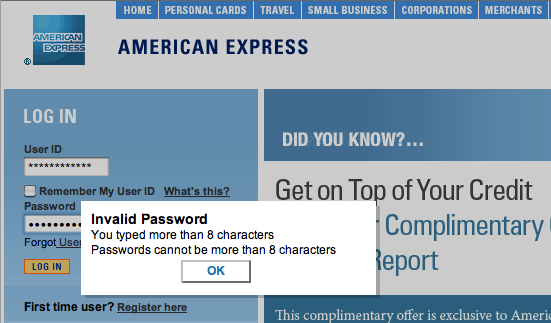
-
Clear password box.
Seriously, Amex?
When I saw the demo of Apple’s new iBooks application, I thought it looked just like Delicious Library, but I figured Apple must have struck a deal with Delicious Monster’s Wil Shipley in order to make that happen.
Alas, they did not.. But Shipley isn’t terribly upset about it.
As a creator, part of what I seek is recognition, immortality. I don’t work for Apple, or Google (I’ve been offered jobs & buyouts) because I want the fame myself. It’s my shot at immortality. My designs are my children. So it stinks when I feel like Steve might get the fame for my innovation. I lose my children, as it were.
But your children aren’t really yours. They have lives of their own. So when your designs do change the world, you have to accept it. You have to say, ‘Ok, this was such a good idea, other people took it and ran with it. I win.’”
Now that’s an attitude worthy of admiration.
You can think of periods of time as a hierarchy:
- Millennium
- Century
- Decade
- Year
- Month
- Day
- Hour
- Minute
- Second
- Minute
- Hour
- Day
- Month
- Year
- Decade
- Century
As time goes forward, changes in periods of time cause changes down the hierarchical chain; an hour doesn’t change without a minute and second changing too, just as a year doesn’t change without a month, day, hour, minute, and second changing along with it.
When we talk about hours, we know that each hour is made up of 60 minutes— minute zero to minute 59. When the clock ticks and that 59 turns to 00, we’ve entered a new hour. Similarly, when 23:59 turns into 0:00, we’ve entered a new day. This works the same way all the way up the chain.
We’ve got no problem agreeing that one second after December 31st at 23:59:59 is January 1st of the following year—a new year. But somehow when we continue up the chain to decades and millennia people freak out and bring Jesus into the equation. Leave that guy out of this discussion.
Look at it this way. Each number in the year corresponds to a period of time. A change in each of the columns indicates a new period of time.
- Change in the ones column, i.e. 2008 -> 2009, indicates a new year.
- Change in the tens column. i.e. 2009 -> 2010, indicates a new decade, along with a new year.
- Change in the hundreds column. i.e. 1899 -> 1900, indicates a new century, along with a new decade, and year.
- Change in the thousands column. i.e. 1999 -> 2000, indicates a new millennium, along with a new century, decade, and year.
It’s a beautiful system. Trying to claim that the Aughts don’t end today, and the Tens don’t start tomorrow is preposterous, as is claiming the decade hasn’t ended yet. The numbers simply don’t back the claim. Today is the end of a decade, and tomorrow is the start of a new decade. Don’t let anyone tell you otherwise.
Here’s a screenshot of my 2Wire 3800HGV-B interface. See anything fishy?
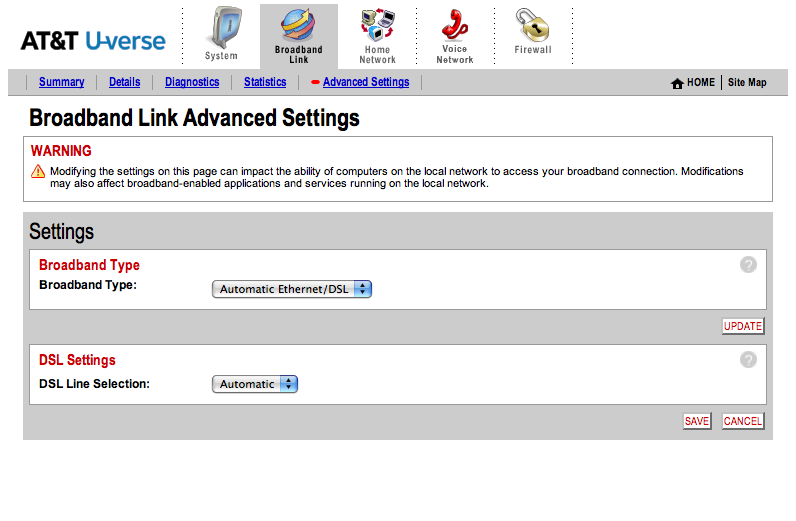
Looks normal and ok, right? Auto detect those settings. Why not?
Yesterday, I was shocked to find out that if you actually specify your broadband type and line settings—mine were DSL and RJ-11, respectively—the difference you will notice in your U-verse DSL speed will make your jaw drop. I discovered this little tidbit while on the line to AT&T’s surprisingly awesome technical support, and it makes me wonder how many people out there are silently dissatisfied with their AT&T U-verse performance, when a solution is so close to home. Honestly, with this much of a performance boost, why didn’t the AT&T installer set up the router this way to begin with?
I had no idea that having the hardware auto-detect the line connections would impact performance so negatively. Consider me informed.
One of my favorite QuickSilver triggers is my TextMate Project launcher. I spend most of the day in one of several TextMate projects, so the first thing I do when I get to my computer is launch one of them.
⇧⎇ + T gets me this:
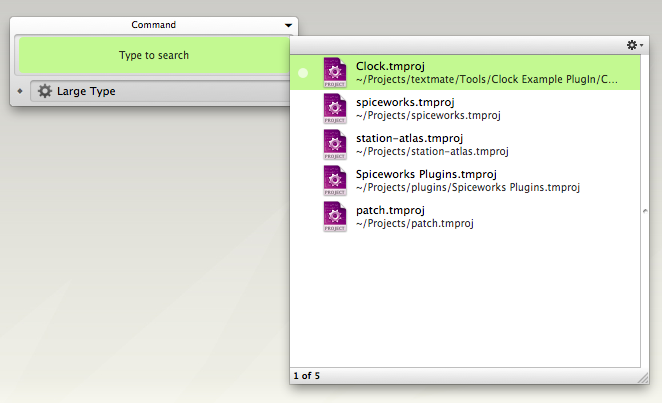
I select the project I want to launch, and I’m on my way.
First create a saved spotlight search. Open up a finder window, and type a search into the search box to get additional search criteria, and save the search after you’ve filled in the criteria you want. My search looked like this:
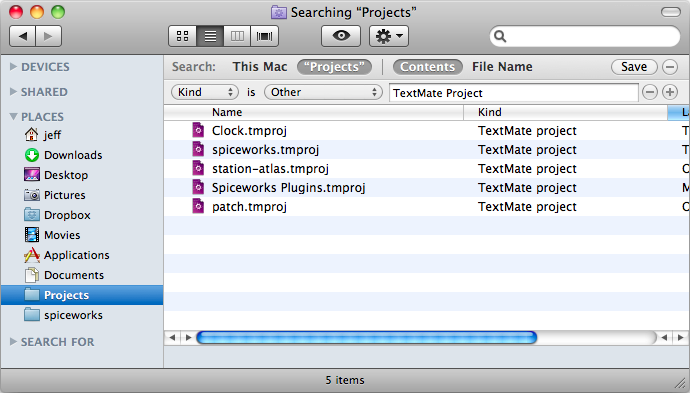
You might have to restart QuickSilver in order to get that saved search to show up, but after you do you should be able to type in the name of that saved search in QuickSilver to retrieve it. Now you just need to create a trigger to pull that up, and you’ll be all set.
Select Triggers under the QuickSilver menu, and add a new HotKey command. Mine looks like this:
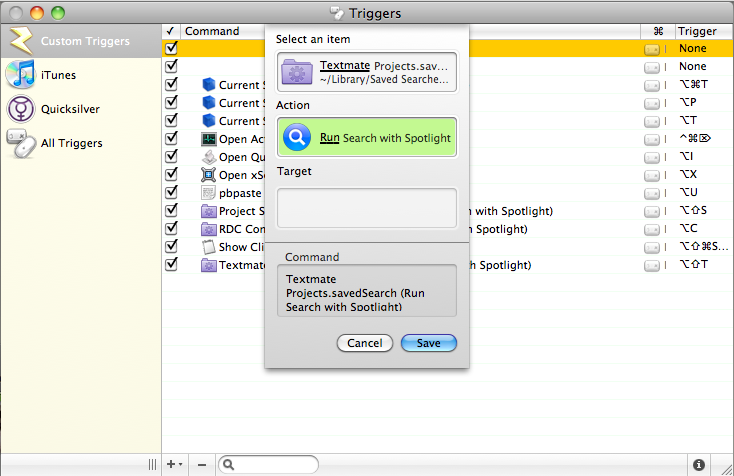
Save it, assign the shortcut you want to it, and you’ll be launching documents in fewer clicks than before.
Back in the early days of Twitter, I made a Twitter bot. All it did was search for tweets containing “zing!”, and then it would reply to that tweet with “OH SNAP!”.
1
2
3
4
5
6
7
8
9
10
11
12
13
14
15
16
17
18

zinger_search = Twitter::Search.new('zing!')
zinger_search.each do |msg|
  if msg["text"] =~ /\szing(!+)$/i
    tweet_id = msg["id"]

    Msg.transaction do
      unless existing_msg = Msg.find(:all, :conditions => ["tweet_id=?", tweet_id]).first
        reply_tos = [msg["from_user"], msg["to_user"]]
        formatted_reply_tos = reply_tos.compact.collect { |r| "@#{r}" }.join(" ")
        from_user = msg["from_user"]
        msg_text = "#{formatted_reply_tos} OH SNAP!"
        new_msg = Msg.create(:reply => msg_text, :from_user => from_user, :tweet_id =>tweet_id)
        twitter.post(new_msg.to_s)
      end
    end
  end
end
Unsurpisingly, it got shut down after a month or so. But surprisingly, it was pretty well loved by the people it replied to. I saved some responses which I sent to Twitter as a plea to let me keep autosnap alive (which they rejected).
thisisconlan: Holy crap. @autosnap is like the sycophantic friend I never had! I’m in love (so to speak).
Cianmm: @alancostello bursts into uproarious laughter Oh, how I love@autosnap
benofsky: @autosnap lol wtf
CannonKnapp: @autosnap haha my A-MAZE-ZING @tweelove got an auto OH SNAP!
theadb: @autosnap lol wasn’t expecting that
harrisj: @senorcorazon If you end your tweets in ZING! (with an exclamation point), then @autosnap will back you up on twitter…
Nourn: I actually just found out about this from fetching my replies, but @autosnap replies to your messages that end with “ZING!” Try it out.
flickrlovr: @autosnap bwahahahaha.
Phatemokid: hahahahahahah awesome @autosnap
theferf: ROFL! Just got pinged by @autosnap > “End a tweet in ZING! and I’ll snap you. It’s not spam if people love you.” Kinda funny.
duffbluff: I am definitely following @autosnap after the unexpected snap I received! Lmao
MySecretSelf: @autosnap Made my profile public just so you would OH SNAP me..
SatelliteFeed: @autosnap I haven’t gotten snaps since college! Awesome!
brenjamin: @autosnap heh.. cool.
willia4: Ok. @autosnap might be the best bot on twitter.
danauer: @autosnap I love you.
EarthaDelights: Haha… don’t think I’ve ever seen @autosnap before. I like it.
BS_Rob: @bafadam @autosnap is pretty awesome.
bafadam: @fhorton @autosnap is brilliant.
Fhorton: @AronHead Holy fuck, I’m totally following @autosnap
johnbrougher: @autosnap We need more “OH SNAP!“s around here. My hat is off to you, sir/ma’am.
JPhilipson: @autosnap it’s people like you that make teh internetz awesome again..
emesser: WTF? @autosnap? That’s… a handy service. I think.
vojha: @autosnap LMAO…
miahz: RT @_gudo lol @autosnap | The things up with which people come…
_gudo: @DontHateBeHated haha.. yeah.. i just ZING ’d and @autosnap hit me w/ the OH SNAP! lol…
GeminiAce: @autosnap I don’t know why that cracks me up so much. lol!
LouTreize: Amazing! End your tweets with a Zing! and you get snapped from@autosnap
ELROSS: @autosnap That…..is freaking awesome. Thank you.
fmll: .. hahah has anyone seen @autosnap ? Just made me chuckle.
nicksieger: @kofno hope you enjoyed the reply from @autosnap as much as I did :)
frsvirtual: this is late, but i thought it was funny i got “oh snap’d” the other day by@autosnap lol heh. :)
wryknow: there’s an account on Twitter that any time you end a tweet with the word Zing! they’ll reply to you with OH SNAP! @autosnap. it’s awesome.
reedbraden: Apparently if you end a tweet in Zing!, @autosnap replies, “OH SNAP!” How incredibly pointless but amazing!
erob1: Because of @autosnap, I might end every tweet in ZING!
benleis: @autosnap Thanks! You’re awesome
jzy: this will grow like wildEfire @autosnap via @betsyphd
joshuawhite: @autosnap // you sir, are the greatest auto-twitter-replier-thing-a-ma-jiggy ever.
I was recently looking for an alarm clock, and had some simple qualifications for suitable models.
- Should not take up the entire nightstand; small is good.
- Alarm clock should be visible in the dark, without lighting up the entire room.
- Must have radio function.
Seems simple, but finding an alarm clock that meets these three requirements are surprisingly difficult.
I think that manufacturers of electrical devices feel that producing an alarm clock is such an easy task, they might as well; they’ve got the parts, they’ve got the people, why not throw something out there? I also imagine they give the least experienced engineer to design this thing, as it’s a relatively straightforward task, and consequences of failure are minimal. I really doubt that they put much thought into the process, because if someone really thought about designing a great alarm clock, wouldn’t we have seen one with a keypad long ago?
Problem encountered on the majority of alarm clocks: Setting the time is difficult for the average human, and in some cases difficult for the advanced human. (See explicit hotel printout on how to set the alarm.)
Logically, you’d think a problem that inhibits a customer from successfully using your product would be on the top of the list of things-to-fix-right-now. Unfortunately, this problem has been largely ignored in the alarm clock world, and instead alarm clock manufacturers have seemingly focused on the following non-problems:
- The numbers aren’t big enough.
- The numbers aren’t bright enough.
- The numbers aren’t being projected onto my ceiling.
The alarm clock I currently have, which is bigger and brighter than it needs to be actually has a “dim” toggle switch which I always have in the “on” position. I can’t imagine why anyone wouldn’t have that enabled because without it the blue display is blinding. Alarm Clock/Radio/Night-light?
It also seems like more and more manufacturers are going away from the classic red letters, which were bright enough to see easily in a dark room while not being confused for a night light, and instead opting for super-bright blue, or green displays. Was there anything wrong with red?
If that wasn’t enough, some manufacturers started adding projectors to their feature list. Oh god, why? How on earth did “Add useless projector to alarm clock” rise above “Make alarm clock usable” on the priority list?
Getting back to my search, after looking through hundreds of alarm clocks online, I found one that was actually pretty impressive, in terms of design: The RCA RPC100.

It’s surprisingly well laid-out, having clearly marked “AM/PM” instead of cryptic dots1, nice looking buttons, pretty sleek looking design over all, and a killer feature (in the alarm clock world, anyway) of having the set alarm time display in the upper right corner of the display2. The green display might be a little brighter than necessary, but I was willing to overlook that because of the strength in the other areas. It actually looks like someone actually designed this thing, rather than just perpetuating the mistakes other manufacturers have made over the years.
There’s a catch, though. This thing is nine inches wide. Nine inches!? That is a monstrous alarm clock.
I still really haven’t found the perfect alarm clock, devoid of all design flaws, but I did find one that seemed to come from a simpler time, where red displays and a small footprint were still the norm. The Insignia NSC211, sold by Best Buy for a mere $10.

It’s not an example of a great alarm clock, but it’s not bad.
What’s your favorite alarm clock?